8,000+ Students, Fragmented Hostel System: Why We Built
HABit
Beta V1
Beta V2

My Role:
Product Designer (Coding Club)
Team:
Apratul (Designer),
Aditya, Ayush (Developers)
Time:
10 Months
Q3 2025 - Q1 2026
Scope:
Mobile App, Web Portal, Design System
Imagine yourself as Raj

A student living in one of the 13 hostels at IITG like other 8000+ students.
To ensure smooth hostel life, the Hostel Affairs Board (HAB) oversees all 13 Hostels which is managed by 7 stakeholders, includes HAB Chairman, Hostel Wardens, HAB Secretaries, Hostel committee, Mess Mangers and Infra planning committee.
The problem
Raj wasn’t happy with the hostel management. Was it just him, or…?
To find out, we surveyed and interviewed 120+ participants across diverse campus stakeholder groups.
Goal was to understand how services are managed in hostels and identify key pain points faced by the students and admins.
View research in depth:
Interview
Survey
Comparative Analysis
Environment Study
We identified:
Unreliable Feedback Loops
67%
Boarders believed their complaints either ignored or take resolution delays.
Disrupted Daily Routines
40%
Boarders reported skipping meals due to big entry lines during peak meal hours.
Less System Transparency
55%
Boarders stated they have no visibility into admin processes, or decision-making.

“
Living in a hostel with problems feels like having a flat tire and no spare.
Master’s student
Defining for 8000+ students
Since Raj wasn’t the only one facing these issues, we discussed them with a team
View define in depth:
Persona

Defined brief
How might we create a platform that simplifies issue reporting and hostel services for students, while enabling hostel management to efficiently track and resolve issues?

Presenting
The solution that fixed hostel issues


Home Page
A page designed to scan hostel status within 5 seconds
High-visibility admin updates
Admin updates shown as priority alerts.

Most-used flows upfront
Appears based on requirements.

Spot favorites instantly
Pin liked items to quickly plan meals at a glance.
Food wastages stats
Increases awareness of food waste, reducing
over-serving.

Upvote the existing issue
No more repeated complaint emails.
15 Affected
Mess
13 May
Rotis were undercooked at Dinner
Several rotis served during dinner were raw in the center.


Complaint Page
Earlier when a problem occur, two things used to happen:
Students sent separate complaint emails.
Sometime they assumes someone else already reported it.
Due to this admin had to manually de-duplicate the inbox.
But why was this happening? because multiple platforms for different complaints and web-only portal required desktop logins, discouraging on-the-spot reporting.
But now, a unified complaints page



See all existing shared-space complaints
Shared spaces are:

And a seamless complaint filing flow...
QRs in shared spaces make filing complaints faster.
Select the location of the complaint
Save time by upvoting complaints
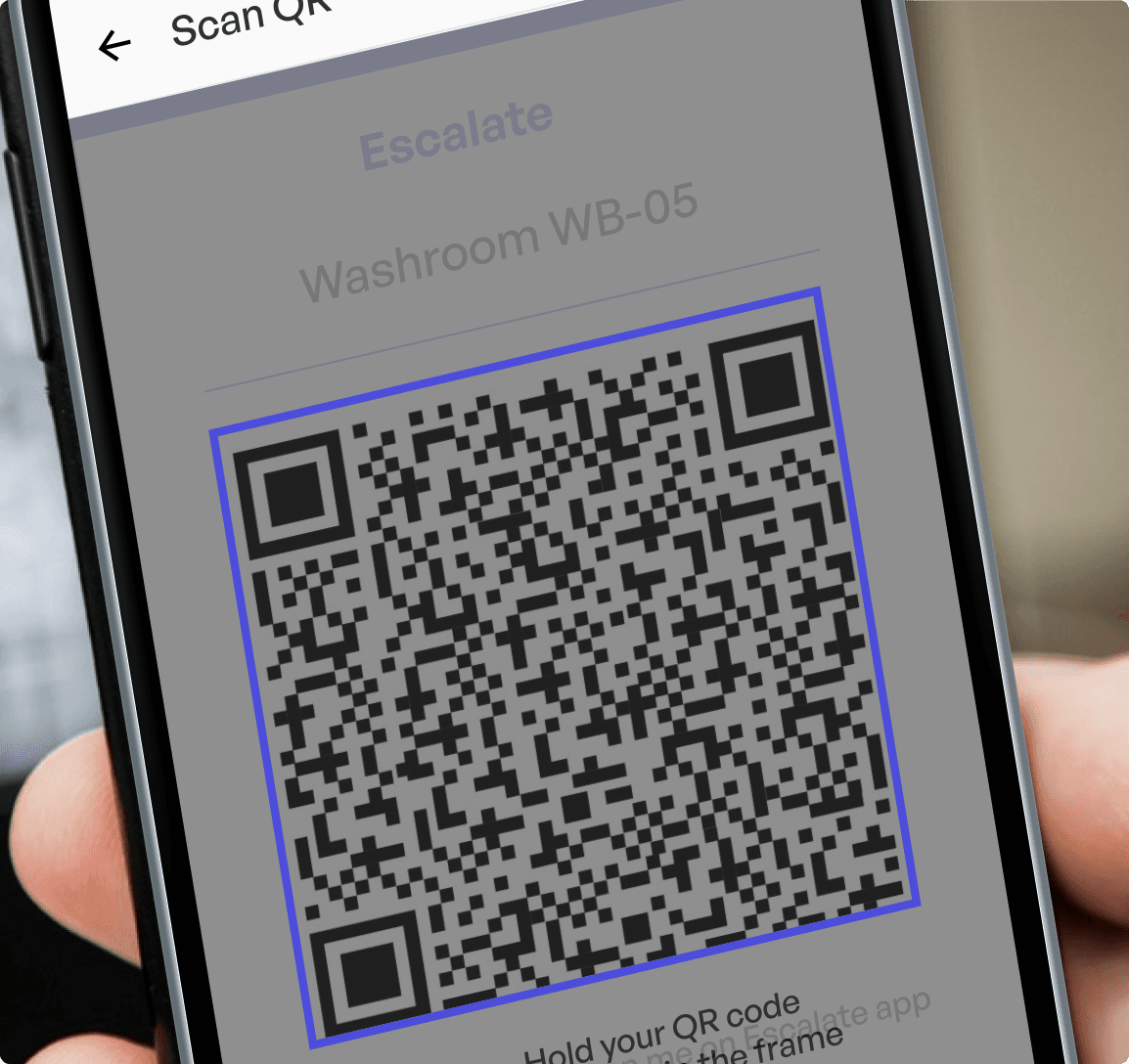


Gets notification in
Status update on the complaint page


And
when admin takes action
Open Complaint page - Click on a button "File Complaint"

Mess
From choosing a mess to managing the meals
Take a meal in 2-steps: scans & show
Zero time wastage in collecting and arranging the mess cards
Earlier…

Arranging 1,000+ shuffled mess cards into holders
Impact
Did the solution actually work?
User Rating:
Released for all 8K+ students
7/10
Students preferred using the app to report issues
40%
Increase in feedback submissions compared to the past system

Scan for Prototype

It wasn’t easy to ship a product for 8,000 students and 7 admins.
Here’s how I built it…
After finding the real problem we explored and filted the ideas with constraints
Research and Defining of problem is shown in the User's story.
From defining the brief to creating the first version design, I kept design seniors in the loop to refine decisions, avoid rework, and focus on high-impact deliverables.


We mapped ideas on an Impact vs. Effort matrix, considering team size, capacity, and timeline as effort constraints. For impact, we evaluated reach, problem severity, and frequency.
This helped us focus on high-impact opportunities and launch a efficient product multi-stakeholder ecosystem serving 8,000+ students quickly.

We finalized these core ideas first, continuously evaluating and adding secondary features as project requirements evolved.
When the scope got too big
While building the Information Architecture, I realized the tight deadline made the project difficult to finish for both student and admin.

I collaborated with the team (Devs, Admin) and decided to build admin portal using AI.
Made on Claude code (10+ screens)
Admin Portal (Web)
Admin needed functional, clean data layout dashboards to take quick actions on backlogs.
Made on Figma (50+ screens)
Students App (Mobile)
Goal was to make the experience so seamless that problems disappear for 8000+ students.
This cut delivery time by 1 week and gave us hands-on experience using AI in design.
To make both interfaces cohesive, we build a few key elements of the design language.
Design Language
Drafting Beta 1: Figma meets Claude
Used Claude for Admin portal (10 screens)
To generate the portal UI, we fed our Information Architecture and Sitemap with clear interaction detail in markdown files, Tailwind design reference directly into Claude Chat. Since native Claude Design tools weren’t available that time, we prompted Claude to generate raw HTML/CSS prototypes.
Leveraging LLMs for rapid UI generation help us to focus on high impact task and gave us more time to work on the user flows. This drastically accelerated the prototyping phase.
Used Figma for Student app (50+ Screens)
Designed 50+ screens in Figma covering every edge case across student user flows.
Home page

Complaint page

Mess Page

When code meets design (and fails)

After developement, I reviewed both developed design and given design, both were very different.

Upon reviewing the initial development build, significant visual inconsistencies emerged. This highlighted a critical gap: we had multiple developers building without a centralized source of truth, and we hadn't accounted for key edge cases. This failure told me why designing systems and edge cases are curical.
What went wrong in testing Beta 1?
I asked users to complete 4 core tasks (3/4 succeeded):
File a washroom complaint for your hostel lobby.
Quickly scan the mess QR.
Apply for mess change.
You like a food and you want to highlight it on the homepage.
Previous design

Iterations:
Added a CTA to discover the feature

After each round of testing, I iterated until the feedback became consistent, confirming the design resonated with users, leading us to select Option 1: A prominent top-right text CTA.

Testing uncovered new real-world pain points I had missed in the first version, which I addressed in Beta 2.
Key refinements after usability testing
Custom Header with expandable updates


Buttons with status indicators

Made favoriting easier for FTUs

Launched Room Cleaning Service
Book a slot of cleaning as per convenience.

Covered possible edge cases
Mess QR Scan Failed
Mess closed day
Zero complaint state
Cancel cleaning slot
Guidelines that aligned design and development
View in depth
Design Principles
Encourage discoverability
Scalabilty
Consistency
Design System

These guidelines helped in solving the problems happened in beta 1 development.
Handoff 2.0: Fixing the developer bridge
Screens and Design System handoff


Connected Figma with AI.
We explored the MCP to link, this allowed the AI to read exact design data (like layout, colors, and components) automatically, that helped developers building the second beta version faster.

From zero to Beta 2: A complete change
Beta 1

Beta 2

Beta 2 serves as a functional foundation rather than a final release. To keep this product continue in the campus, our team handed the project over to the incoming Coding Club heads.
Learnings and key takeaways
Navigating these constraints provided valuable lessons in system architecture, cross-functional alignment, and designing for real-world user behavior.

Test with real users quickly

Leverage AI wherever necessary
📈
Edge Cases

Internal Polices

Constraints

Society aspect

Development
Value of Diverse Perspectives
Collaborate and Take Feedbacks


Craft Stories in Users Journey
Thank you for scrolling